8.2.4. Sample Files
Sample files are used to create the files necessary to work with certain scripts and commands. They are installed in the /usr/share/opa/samples directory, including the opagentopology sample script.
Note
Do not edit the sample files.
8.2.4.1. Packet Capture Files
The following files are used with opapacketcapture.
File | Description |
|---|---|
| Packet filter configuration. |
| Trigger configuration for the condition to terminate packet capture. |
8.2.4.2. Topology Files
The following files are related to topology.
File | Description |
|---|---|
| Information about the |
| Information about the opaxlattopology script, minimal_topology.xlsx, and detailed_topology.xlsx files. |
| Script to generate topology file. Refer to |
| Text CSV values for LinkSummary information. Used as input to |
| Text CSV values for SuperNIC Nodes information. Used as input to |
| Text CSV values for Switch Nodes information. Used as input to |
| Text CSV values for Subnet Manager (SM) information. Used as input to |
| Sample CSV configurations. Refer to |
| Topology files in spreadsheet format. Refer to Sample Topology Spreadsheets for additional details. |
| Port counter threshold files for use with |
8.2.4.3. Miscellaneous Files
The following files are used for miscellaneous scripts and commands.
File | Description |
|---|---|
| Script to help generate DHCP stanzas to append to Uses host and MAC addresses. |
| Configuration file for Used in |
| Configuration file for generation of OpenSSL CA certificate requests. |
| Configuration file for generation of OpenSSL certificate requests. |
| Configuration file for SSL parameters. |
8.2.4.4. Sample Topology Spreadsheets
This section describes the sample topology spreadsheet files: detailed_topology.xlsx and minimal_topology.xlsx. Both files are installed in the /usr/share/opa/samples directory.
Note
In this section, <topologyfile> indicates the file you customize for your cluster.
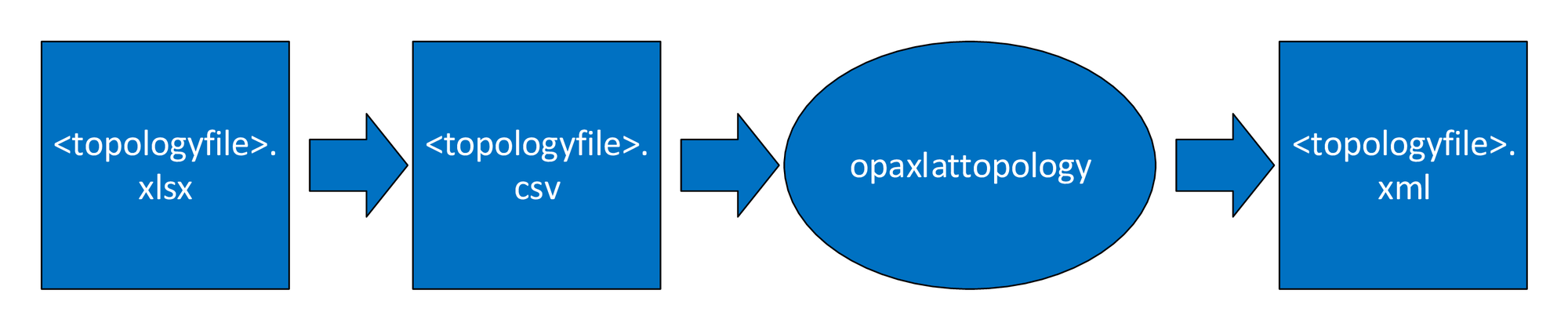
The following figure shows the multi-step process to generate the XML file required by topology verification tools, such as opareport. First, select and edit one of the sample topology XLSX files. Save the edited information in CSV format, and run the opaxlattopology script, which produces the <topologyfile>.xml file.
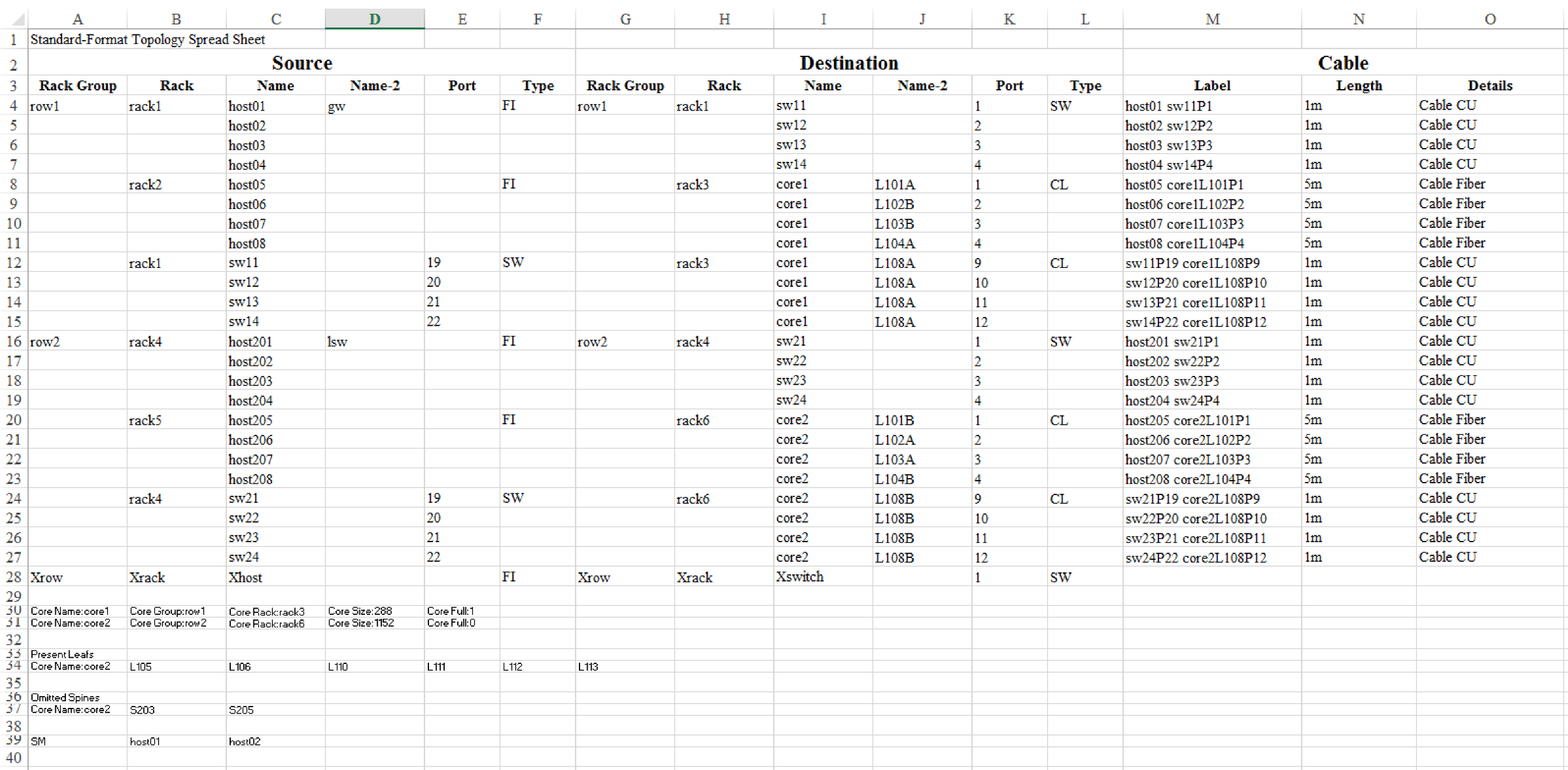
The two sample files, detailed_topology.xlsx and minimal_topology.xlsx, provide a standard format for representing each external link in a cluster. Each row in the minimal_topology.xlsx spreadsheet depicts one link containing Source, Destination, and Cable fields. The detailed_topology.xlsx spreadsheet contains an additional Link field providing link-specific details. In both spreadsheets, the cells cannot contain commas.
 |
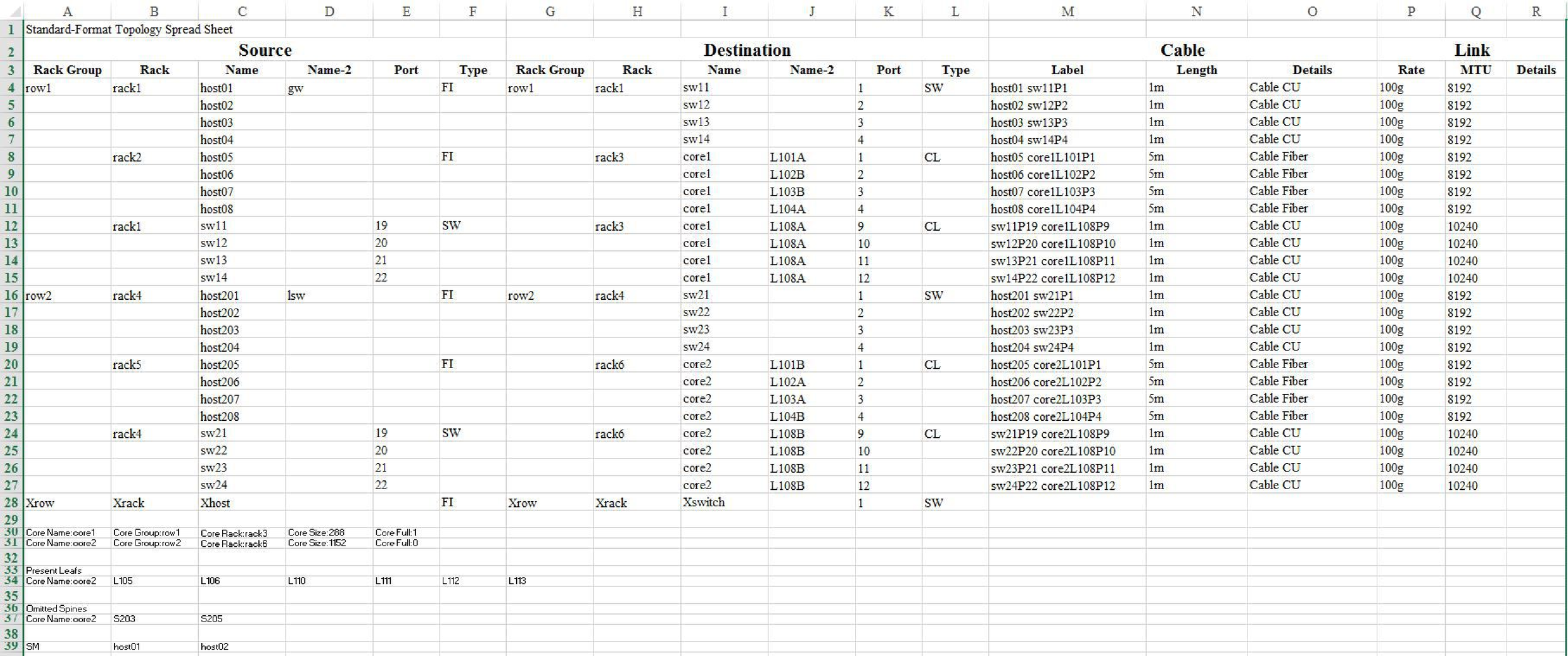 |
The previous figures show examples of links between SuperNIC and CN5000 Switch (rows 4-7), SuperNIC and Core Switch (rows 8-11), and CN5000 Switch and Core Switch (rows 12-15).
Source and Destination fields each have the following columns:
Rack Group (first row required)
Use this field to specify a Row or location of cluster hardware. The first row in the spreadsheet must have a value. If the Rack Group or Rack field is empty on any row, the script defaults the value in that field to the closest previous value.
Rack (optional)
Use this field to specify a rack unit number for the device.
Name (required)
User-defined primary name of host or switch. Cornelis recommends that host names match the host names configured in
/etc/hosts.Hosts use the following information:
Host Fabric Interface: Hostname or hostdetails
Edge Switch: Switchname
Core Leaf: Corename or L
nnn
Name-2 (optional)
For hosts, Name-2 is optional and is output as NodeDetails in the topology XML file.
Port (required)
Port contains the port number of the SuperNIC or Switch port. If the Port field is empty, the script defaults to 1.
Type
Type contains the device type. When creating the spreadsheet to verify external links, use the following values for type:
FI,SW, andCL.The first row must have a value. If the Type field is empty on any row, the script defaults the value to the closest previous value. The type values are:
Host Fabric Interface:
FIfor SuperNIC adapterEdge Switch:
SWCore Leaf:
CLfor DCS core leaf module
The Cable field has the following columns:
Label - Max characters = 57
Length
Details
Note
Cable values are optional and have no special syntax.
The Link fields have the following columns:
Rate
Details
Note
Link fields are optional and have no special syntax. An example can be seen on detailed_topology.xlsx.
8.2.4.4.1. Core Full Statement
At the bottom of each sample topology file, there is a Core Full statement to indicate if the DCS is fully populated with all spine and leaf modules installed. If there are multiple DCSs in the fabric, each DCS should have an entry in your <topologyfile>.xlsx file as shown in the following table.
|
|
|
|
|
|
|
|
|
|
|
|
|
|
|
8.2.4.4.2. Present Leaf Statement
This section should be used when the Core is partially populated (Core Full:0). Present Leaf Statement is used to specify the list of all present Leafs in the Core. This section can have multiple rows for each partially populated Core in the fabric.
There is no need to list the leaf names that have already been listed in the external link section as either Source Name or Destination Name.
|
|
|
|
|
|
|
|
|
|
|
8.2.4.4.3. Omitted Spine Statement
This section should also be used when the Core is partially populated (Core Full:0). The Omitted Spine Statement is used to list all the missing Spines from the Core. This section can have multiple rows for each partially populated Core in the fabric.
|
|
|
|
|
|
8.2.4.4.4. SM Statement
This section can be used to list all the expected SMs in the fabric. The section can have multiple cells to indicate any number of SMs in a fabric.
Note
Expected SM cannot be added with the detail levels, such as within a specific rack or group.