3.6.4. Verify Topology
OPA software commands provide several ways to help in validating a running fabric's configuration and layout against a predefined/expected topology. This verification process can help identify some issues including detecting missing cables, hosts, or switches; or verifying that cables are in the correct places. You can run topology verification tools during the initial fabric startup or at any other time after a fabric is configured. The Fabric Manager can also be set to verify the topology every time a sweep of the fabric is done (using the Fabric Manager's predefined topology verification feature).
3.6.4.1. Creating the Expected Fabric Layout File
The expected fabric layout is defined by an input file in XML format. Topology verification tools use this file along with the actual fabric configuration to analyze a fabric.
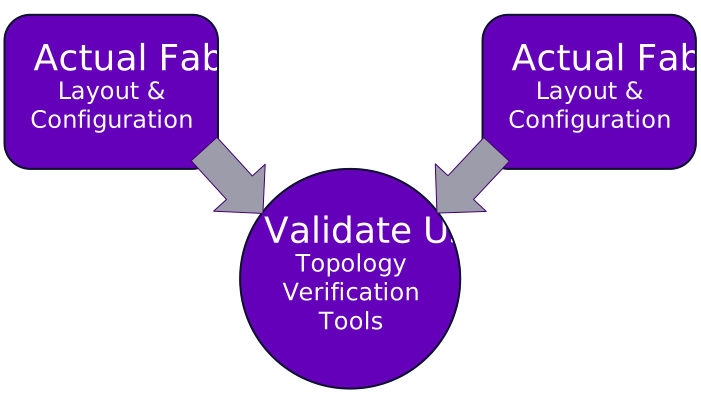
Use the opaxlattopology tool to translate a user-friendly, CSV-formatted file into the required XML format. To create a custom <topologyfile>.xml file, perform the following:
Edit one of the sample files (
detailed_topology.xlsxorminimal_topology.xlsx) found in the/usr/share/opa/samplesfolder to depict the expected layout of the fabric.Refer to CN5000 Commands Guide, Sample Topology Spreadsheets for more details.
Save the custom
<topologyfile>.xlsx.Run the
opaxlattopologytool against the CSV file to get the expected fabric layout in XML format.Refer to
opaxlattopology(8)for more details.You can now use the
<topologyfile>.xmlfile to verify or validate against the actual fabric layout.
3.6.4.2. Validating a Topology Against an Actual Fabric Layout
opareport is one of the main tools provided by OPA software commands used in the topology verification process. It provides various options to verify specific parts of the fabric. All these options require a customized <topologyfile>.xml file as an input.
The following table summarizes the opareport options as well as the specific area of the fabric that they are used to verify.
Command | Verifies |
|---|---|
| SuperNIC |
| Switches |
| Nodes |
| Nodes running SM |
| Links |
| Links External to a System |
| Links to SuperNIC |
| Inter Switch Links |
| Inter Switch Links, External to System |
| All the Parameters |
The CN5000 Commands Guide, Advanced Topology Verification provides a detailed explanation to help interpret the opareport output for some of the output types above.
Refer to the following for additional verification details:
Topology verification using
opareportOther topology verification tool:
opalinkanalysisFabric verification using
opafabricanalysis
Note
Fabric Manager also has a feature called predefined topology verification that can be used to detect dynamic changes that can occur in a fabric while the Fabric Manager is running. This feature also relies on an input XML topology file that describes nodes and links using a combination of Node GUIDs, Node Description, and Port number. This can be created by using opaxlattopology as explained above. When enabled, the predefined topology verification is done on every Fabric Manager sweep of the fabric. The Fabric Manager can be customized to define which fields are checked and the behavior that takes place when a topology mismatch is detected (that is, quarantine the offending node). Refer to the CN5000 Provisioning and Security Guide for more details.
3.6.4.3. Interpreting Output of Topology Verification Tools
Use the command opareport -o verifyall -T <topologyfile>.xml to verify SuperNIC, switches, SMs, and links.
3.6.4.3.1. No Errors Detected
If no errors are detected in the topology, an output is shown similar to the example below:
[root@node057 topology]$ opareport -o verifyall -T topology.xml
Getting All Node Records...
Done Getting All Node Records
Done Getting All Link Records
Done Getting All Cable Info Records
Done Getting All SM Info Records
Done Getting vFabric Records
Parsing topology.xml...
FIs Topology Verification

FIs Found with incorrect configuration:
4 of 4 Fabric FIs Checked

FIs Expected but Missing or Duplicate in input:
4 of 4 Input FIs Checked

Total of 0 Incorrect FIs found
0 Missing, 0 Unexpected, 0 Duplicate, 0 Different
-------------------------------------------------------------------------------
SWs Topology Verification

SWs Found with incorrect configuration:
1 of 1 Fabric SWs Checked

SWs Expected but Missing or Duplicate in input:
1 of 1 Input SWs Checked

Total of 0 Incorrect SWs found
0 Missing, 0 Unexpected, 0 Duplicate, 0 Different
-------------------------------------------------------------------------------
SMs Topology Verification

SMs Found with incorrect configuration:
1 of 1 Fabric SMs Checked

SMs Expected but Missing or Duplicate in input:
1 of 1 Input SMs Checked

Total of 0 Incorrect SMs found
0 Missing, 0 Unexpected, 0 Duplicate, 0 Different
-------------------------------------------------------------------------------
Links Topology Verification

Links Found with incorrect configuration:
4 of 4 Fabric Links Checked

Links Expected but Missing, Duplicate in input or Incorrect:
4 of 4 Input Links Checked

Total of 0 Incorrect Links found
0 Missing, 0 Unexpected, 0 Misconnected, 0 Duplicate, 0 Different
-------------------------------------------------------------------------------
For each verification type run by the tool, the following attributes are reported:
Missing
Unexpected
Misconnected
Duplicate
Different
3.6.4.3.2. Possible Errors Detected
The following two examples show possible error conditions, as well as an interpretation of the output that the opareport tool will report.
The example below shows an output of a verification where only one side of the expected links matches a port in fabric. No link exists in the topology file for node059 hfi1_0. For this error condition, the tool can confidently match the other side of the link and can indicate that one side of the link is incorrect. Two issues are reported: one unexpected and one misconnected link.
[root@node057 topology]$ opareport -o verifyall -T topology.xml
Getting All Node Records...
Done Getting All Node Records
Done Getting All Link Records
Done Getting All Cable Info Records
Done Getting All SM Info Records
Done Getting vFabric Records
Parsing topology.xml...
FIs Topology Verification

FIs Found with incorrect configuration:
4 of 4 Fabric FIs Checked

FIs Expected but Missing or Duplicate in input:
4 of 4 Input FIs Checked

Total of 0 Incorrect FIs found
0 Missing, 0 Unexpected, 0 Duplicate, 0 Different
-------------------------------------------------------------------------------
SWs Topology Verification

SWs Found with incorrect configuration:
1 of 1 Fabric SWs Checked

SWs Expected but Missing or Duplicate in input:
1 of 1 Input SWs Checked

Total of 0 Incorrect SWs found
0 Missing, 0 Unexpected, 0 Duplicate, 0 Different
-------------------------------------------------------------------------------
SMs Topology Verification

SMs Found with incorrect configuration:
1 of 1 Fabric SMs Checked

SMs Expected but Missing or Duplicate in input:
1 of 1 Input SMs Checked

Total of 0 Incorrect SMs found
0 Missing, 0 Unexpected, 0 Duplicate, 0 Different
-------------------------------------------------------------------------------
Links Topology Verification

Links Found with incorrect configuration:
Rate NodeGUID          Port Type Name
100g 0xd0066a010265baf7  46 SW   Switchbaf7
<->  0xd0066a8101660683   1 FI   node059 hfi1_0
Unexpected Link

4 of 4 Fabric Links Checked

Links Expected but Missing, Duplicate in input or Incorrect:
Rate MTU   NodeGUID          Port or PortGUID    Type Name
100g  8192                      1                FI login1 hfi1_0
<->                            46                SW Switchbaf7
Incorrect Link, 1st port found to be:
     0xd0066a8101660683   1 FI   node059 hfi1_0

4 of 4 Input Links Checked

Total of 2 Incorrect Links found
0 Missing, 1 Unexpected, 1 Misconnected, 0 Duplicate, 0 Different
-------------------------------------------------------------------------------
The example below shows a situation where both sides of an expected link match the same port in the fabric. In this output, the tool indicates that either the input topology file has an issue (duplicate occurrence of the port) or the link is incorrectly cabled.
[root@node057 topology]$ opareport -o verifyall -T topology.xml
Getting All Node Records...
Done Getting All Node Records
Done Getting All Link Records
Done Getting All Cable Info Records
Done Getting All SM Info Records
Done Getting vFabric Records
Parsing topology.xml...
FIs Topology Verification

FIs Found with incorrect configuration:
4 of 4 Fabric FIs Checked

FIs Expected but Missing or Duplicate in input:
4 of 4 Input FIs Checked

Total of 0 Incorrect FIs found
0 Missing, 0 Unexpected, 0 Duplicate, 0 Different
-------------------------------------------------------------------------------
SWs Topology Verification

SWs Found with incorrect configuration:
1 of 1 Fabric SWs Checked

SWs Expected but Missing or Duplicate in input:
1 of 1 Input SWs Checked

Total of 0 Incorrect SWs found
0 Missing, 0 Unexpected, 0 Duplicate, 0 Different
-------------------------------------------------------------------------------
SMs Topology Verification

SMs Found with incorrect configuration:
1 of 1 Fabric SMs Checked

SMs Expected but Missing or Duplicate in input:
1 of 1 Input SMs Checked

Total of 0 Incorrect SMs found
0 Missing, 0 Unexpected, 0 Duplicate, 0 Different
-------------------------------------------------------------------------------
Links Topology Verification

Links Found with incorrect configuration:
Rate NodeGUID          Port Type Name
100g 0xd0066a010160357f   1 FI   node060 hfi1_0
<->  0xd0066a010265baf7  37 SW   Switchbaf7
Unexpected Link

4 of 4 Fabric Links Checked

Links Expected but Missing, Duplicate in input or Incorrect:
Rate MTU   NodeGUID          Port or PortGUID    Type Name
100g  8192                      1                FI node059 hfi1_0
    Duplicate Port in input or incorrectly cabled
<->                            37                SW Switchbaf7
    Duplicate Port in input or incorrectly cabled
Duplicate Port in input or incorrectly cabled

4 of 4 Input Links Checked

Total of 2 Incorrect Links found
0 Missing, 1 Unexpected, 0 Misconnected, 1 Duplicate, 0 Different
-------------------------------------------------------------------------------
Note
The opareport verification tool reports all issues from multiple perspectives. Therefore, it may output incorrect links more than once. The tool does not try to match up issues or differentiate the source of duplicate errors. For example, the same error could be reported twice, once appearing as a mismatched port on an expected link, and again as an error looking like a cabling mistake.